(Form 16, AIS, 26AS, TDS, deductions, HRA, old vs new regime and refund checks every salaried employee should complete before filing ITR.)
Quick Answer
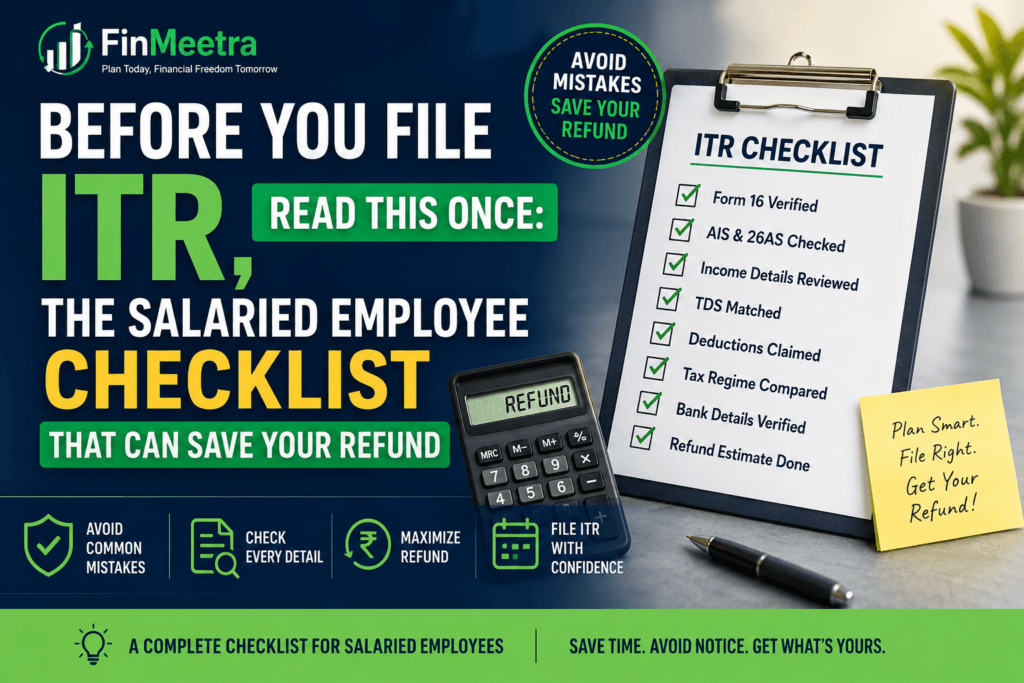
Before filing ITR, a salaried employee should not simply copy Form 16 and click submit. First check Form 16 Part A and Part B, match TDS with Form 26AS, compare income shown in AIS/TIS, verify salary from current and previous employers, include bank interest and other income, confirm old vs new regime, claim eligible deductions and exemptions correctly, validate bank details for refund, and e-verify the return after filing.
The biggest ITR mistake is assuming that TDS deducted by employer means the return is automatically correct. TDS is only tax deducted during the year. Your final ITR may still show refund, tax payable, or mismatch depending on income, deductions, regime and tax credits. A clean ITR is not created by speed. It is created by reconciliation.
Why Salaried Employees Should Pause Before Filing ITR
For many employees, ITR filing starts with one thought: Form 16 has arrived, so filing should take ten minutes. That confidence is useful, but it can also be expensive. Form 16 is important, but it is not the full financial story of the year.
Your employer knows your salary and the proofs you submitted through payroll. It may not fully know your savings account interest, fixed deposit interest, capital gains, dividend income, income from a previous employer, rent income, freelance income, or errors sitting inside AIS. The Income Tax portal can prefill many fields, but prefilled does not always mean verified. A mismatch can quietly move your return from refund expected to tax payable.
This is why FinMeetra treats ITR filing as a checklist, not a race. Filing early is good. Filing correctly is better. Filing blindly is how refunds get stuck in a maze with bad lighting.
ITR Filing Is Not Just Form 16 Upload
Form 16 is your salary tax certificate. It shows salary paid, deductions and exemptions considered by employer, and TDS deducted. But your income tax return is a full-year tax statement. It has to include salary, other income, deductions, tax credits and final tax liability.
| Item | What It Tells You | Why It Matters Before Filing |
| Form 16 Part A | Employer TAN, PAN, TDS deposited quarter-wise | Confirms salary TDS credited by employer |
| Form 16 Part B | Salary breakup, deductions, taxable salary | Shows what payroll considered |
| Form 26AS | TDS/TCS/tax paid summary | Checks whether tax credit is visible |
| AIS/TIS | Income and financial information reported to tax portal | Finds interest, dividends, securities transactions and mismatches |
| Bank statements | Interest, credits and payments | Useful to verify income and refund account |
| Investment proofs | 80C, 80D, NPS, home loan and other proofs | Prevents missed deduction or wrong claim |
If your salary changed or TDS suddenly increased during the year, first read FinMeetra’s How to Stop Extra TDS From Eating Your Monthly Salary. That guide explains how payroll TDS depends on declarations, proof submission and regime choice.
The FinMeetra ITR Refund Safety Calculator
Before filing, use the calculator to estimate whether your ITR may show refund or tax payable. Enter salary as per Form 16, salary TDS, previous employer income, interest income, other income, old-regime deductions, HRA, NPS, home loan interest, other TDS and advance tax. The calculator will estimate your tax, refund/payable position and major mismatch risk areas.
ITR Refund Safety Check Calculator
Check Form 16, AIS, 26AS, TDS, deductions and refund risk before filing ITR
Form 16 is not enough
Match Form 16 with AIS and Form 26AS before filing.
TDS is not final tax
Interest, job switch income and regime choice can change refund or payable.
Verify after filing
ITR is not complete until e-verification is done.
What Your Calculator Result Means
| Result | Meaning | Action |
| Refund expected | Tax credits are higher than estimated final tax | Check bank account, AIS, 26AS and e-verify return |
| Small tax payable | Some income may not have TDS or deductions may be lower | Pay before filing or adjust details correctly |
| Large tax payable | Likely missing income, previous employer salary, regime issue or TDS gap | Reconcile before submitting |
| AIS mismatch risk | Income in AIS may not match what you planned to file | Review AIS/TIS and submit feedback if needed |
| Old regime wins | Deductions and exemptions are valuable for you | Verify proofs and claim only eligible items |
| New regime wins | Lower slabs beat deduction-heavy old regime | Avoid buying tax products only to force old regime |
12 Things Salaried Employees Must Check Before Filing ITR
1. Confirm Whether ITR-1 or ITR-2 Applies to You
Many salaried employees can use ITR-1 when income is simple and conditions are satisfied. But if you have capital gains, multiple house properties, foreign assets, certain losses, or other situations outside ITR-1 eligibility, ITR-2 may be required. Do not choose the form only because last year you used it. One new transaction can change the return form.
2. Match Form 16 Part A With Form 26AS
Part A of Form 16 shows TDS deducted and deposited by employer. Form 26AS shows whether the tax credit is visible in the tax system. If TDS is deducted from salary but not visible in Form 26AS, the ITR may not give proper credit. This is one reason refunds get delayed or tax payable appears unexpectedly.
3. Check Form 16 Part B Salary Breakup
Part B shows salary, allowances, exemptions and deductions considered by payroll. Check gross salary, standard deduction, professional tax, HRA exemption if claimed, 80C, 80D, NPS and taxable salary. If any proof was rejected by employer, it may not appear in Form 16. You may still be able to claim eligible deductions in ITR if you have valid proof and the law allows it, but you should not claim anything casually.
4. Download AIS and TIS Before Filing
AIS contains income and transaction information reported to the tax portal. For salaried employees, this may include salary, interest, dividends, securities transactions, mutual fund transactions, TDS, TCS and more. If AIS shows bank interest that you forgot, your refund calculation can change. If AIS shows wrong information, review it and respond where appropriate instead of ignoring it.
5. Include Savings Account and FD Interest
This is one of the most common salaried employee mistakes. Bank interest may look small monthly, but across savings accounts and fixed deposits it can become taxable. TDS may or may not have been deducted. If you do not include interest income, the ITR can mismatch with AIS.
6. Report Previous Employer Income After Job Switch
If you changed jobs during the financial year, current employer Form 16 may not fully solve your ITR. You need salary and TDS details from previous employer too. If both employers gave slab benefit independently, final tax may be higher than expected. This is not a penalty. It is the annual tax math catching up.
7. Recheck Old vs New Tax Regime
Do not select the regime based on memory. Old regime may help if you have HRA, 80C, 80D, NPS, home loan interest and other deductions. New regime may win if deductions are low and lower slabs are enough. The right regime can change year to year.
8. Do Not Stop at 80C
80C is popular, but it is not the full tax plan. Check 80D health insurance premium, NPS under 80CCD(1B), employer NPS under 80CCD(2), HRA under old regime, home loan interest, education loan interest under 80E, donations under 80G and savings interest deduction where applicable. The goal is not to claim everything. The goal is to avoid missing what genuinely applies.
9. Verify HRA Claim Properly
HRA is not simply rent paid. It depends on HRA received, salary, city and rent paid over 10% of salary. Under the new tax regime, HRA exemption is generally not available. If you claim HRA under the old regime, keep rent receipts, agreement, payment proof and landlord PAN where required.
10. Check Home Loan and House Property Details
If you have a home loan, verify interest certificate, principal repayment, property status and whether the benefit is allowed under the chosen regime. Do not copy last year numbers. Loan interest and principal change every year.
11. Verify Bank Account for Refund
A correct return can still face refund delay if bank details are wrong, not pre-validated, or PAN is not linked as required. Before filing, verify bank account, IFSC, account status and e-filing portal validation.
12. E-Verify After Filing
Filing is not fully complete until the return is verified. E-verification through Aadhaar OTP, net banking or other available methods should be done within the allowed timeline. A return filed but not verified can create unnecessary trouble.
For regime comparison, use FinMeetra’s Old vs New Tax Regime Calculator. If your tax planning is still stuck at 80C, read The Rs.3 Lakh Tax Saving Mistake Most Salaried Employees Make Every Year and PPF vs ELSS vs NPS Calculator before making last-minute investment decisions.
ITR Checklist Table for Salaried Employees
| Checklist Item | Where to Check | Risk if Missed |
| Correct ITR form | Income details and ITR eligibility | Defective or incorrect return |
| Salary from all employers | Form 16 from each employer | Tax payable after filing |
| TDS credit | Form 16 Part A + Form 26AS | Refund delay or tax demand |
| AIS/TIS income | AIS on e-filing portal | Mismatch or missed income |
| Bank interest | Bank statement / interest certificate | Additional tax payable |
| Tax regime | Old vs new calculation | Higher tax than necessary |
| Deductions | Proofs and eligible sections | Lower refund or wrong claim |
| Refund bank account | E-filing profile | Refund failure/delay |
| E-verification | Post-filing confirmation | Return not processed |
A Realistic Salary Snapshot: How Refund Becomes Tax Payable
Consider a salaried employee with ₹18 LPA salary. Employer deducted TDS based on salary declarations. The employee expects a refund because 80C and HRA were considered in payroll. But before filing, AIS shows ₹48,000 FD interest, Form 26AS shows one quarter of previous employer TDS, and previous employer salary of ₹2.20 lakh was not added in the current employer projection.
| Item | Before Checking | After Checking | Impact |
| Current employer salary | ₹18,00,000 | ₹18,00,000 | No change |
| Previous employer salary | Ignored | ₹2,20,000 | Taxable income increases |
| FD/savings interest | Ignored | ₹48,000 | Other income added |
| 80D health insurance | Not claimed | ₹25,000 | Deduction restored under old regime |
| TDS credit | Assumed as per Form 16 only | Matched with 26AS | Credit clarity |
| Final result | Refund expected | Small tax payable/refund lower | No surprise after reconciliation |
The employee did not make a huge tax mistake. The problem was incomplete reconciliation. This is why the checklist matters. It does not make tax magical. It prevents avoidable surprises.
The 7-Step FinMeetra ITR Filing Flow
| Step | Action | Why It Works |
| Step 1 | Download Form 16 from all employers | Captures salary and TDS |
| Step 2 | Download AIS, TIS and Form 26AS | Finds reported income and tax credit |
| Step 3 | List all other income | Interest, dividends, capital gains, rent and other income |
| Step 4 | Compare old vs new regime | Avoids paying more tax by habit |
| Step 5 | Enter only eligible deductions | Prevents wrong claims and missed deductions |
| Step 6 | Check refund/payable and bank details | Reduces refund delay risk |
| Step 7 | File and e-verify | Completes the filing process |
What to Do If ITR Shows Tax Payable
Do not panic immediately. Tax payable does not automatically mean something is wrong. It means your final tax is higher than your tax credits. Check whether interest income, previous employer salary, bonus, capital gains or lower deductions increased tax. Also check whether TDS credit is missing in 26AS.
If tax payable is correct, pay it before filing or while filing through the portal flow. If the issue is tax credit mismatch, reconcile with employer, deductor, bank or relevant source before assuming the return is wrong.
This connects naturally with FinMeetra’s Before You Accept That Offer Letter, Read This Once and The Offer Letter Trap guides. Job switching can improve salary, but it can also create salary and TDS overlap if previous employer income is ignored.
Where Should Your Refund Go?
A refund is not bonus income. It is your own money coming back. Before spending it casually, give it a job.
| Refund Amount | First Use | Next Use |
| Up to ₹10,000 | Emergency fund top-up | Small debt cleanup |
| ₹10,000 to ₹50,000 | Health insurance/term insurance gap check | SIP or emergency fund |
| ₹50,000 to ₹1 lakh | Close high-cost debt or build safety | Step-up SIP |
| Above ₹1 lakh | Review debt, insurance and goals | Invest based on asset allocation |
If refund improves your cash flow, first read the Emergency Fund Guide. After safety is handled, use the SIP Calculator or Step-Up SIP Calculator to convert refund money into long-term wealth.
Key Takeaways
- Form 16 is important, but it is not the full ITR checklist.
- Always compare Form 16, AIS/TIS and Form 26AS before filing.
- TDS deducted by employer does not guarantee refund.
- Previous employer salary is a common job-switch ITR mistake.
- Bank interest and FD interest can quietly change tax payable.
- Old vs new regime should be checked every year.
- Eligible deductions should be claimed carefully, with proof.
- Correct bank account and e-verification are important for refund processing.
- Use refund money for emergency fund, debt cleanup or investing, not random spending.
Frequently Asked Questions
Q: Is Form 16 enough to file ITR?
Form 16 is very important, but it is not always enough. You should also check AIS, TIS, Form 26AS, bank interest, previous employer income, deductions and refund bank details.
Q: Why does ITR show tax payable even after TDS?
This can happen when income outside salary is added, previous employer income is missing from payroll estimate, deductions are lower, regime selection changes or TDS credit is not fully visible.
Q: Should salaried employees check AIS before filing ITR?
Yes. AIS may show interest, dividends, securities transactions, TDS, TCS and other reported information. It should be reviewed before filing.
Q: What is the difference between Form 26AS and AIS?
Form 26AS is mainly useful for tax credit and TDS/TCS/tax paid information. AIS is broader and can include income and transaction information reported to the tax department.
Q: Can I claim deductions not shown in Form 16?
In many cases, eligible deductions may be claimed in ITR if you have valid proof and the law allows it. However, do not claim deductions casually or without documentation.
Q: Which tax regime should salaried employees choose?
It depends on income and deductions. Old regime may help if HRA and deductions are high. New regime may help if deductions are low. Compare both before filing.
Q: What if AIS shows wrong information?
Review the AIS entry carefully and use the available feedback mechanism where applicable. Do not blindly ignore large mismatches.
Q: Do I need previous employer Form 16 after job switch?
Yes, if you changed jobs during the financial year, previous employer salary and TDS should be considered while filing ITR.
Q: What can delay salary tax refund?
Mismatch in TDS credit, wrong bank account, non-validation of bank account, incorrect return details, missed e-verification or processing issues can delay refund.
Q: What should I do after filing ITR?
E-verify the return, save acknowledgement, track processing status and respond to any notice or mismatch carefully.
Related Articles You Should Read Next
- How to Stop Extra TDS From Eating Your Monthly Salary — Fix salary TDS before it damages monthly take-home.
- Old vs New Tax Regime Calculator — Compare tax regimes before filing.
- PPF vs ELSS vs NPS Calculator — Choose tax-saving investments with clarity.
- The Rs.3 Lakh Tax Saving Mistake — Avoid bad last-minute tax decisions.
- The Hidden Tax Savings Most Salaried Employees Miss in Their Salary Structure — Understand salary structure tax levers.
- The Hidden Salary Deductions Nobody Explains Until It Is Too Late — Understand deductions before judging take-home salary.
- Emergency Fund Guide — Use refund or surplus to build safety.
- When Will You Become Financially Free? — Connect tax savings to long-term freedom.
Useful External Resources
- Income Tax Department – Salaried Individuals for AY 2026-27
- Income Tax Department – File ITR-1 (Sahaj) Online FAQs
- Income Tax Department – Annual Information Statement (AIS)
- Income Tax Department – View Tax Credit Mismatch FAQs
- Income Tax Department – Form 26AS and tax credit resources
Enjoyed This Blog? Here Is What You Can Do Next
Leave a Comment — Did your ITR ever show tax payable when you expected a refund?
Subscribe to FinMeetra Newsletter — Practical salary, tax, investing and financial freedom guides every week.
Use the ITR Refund Safety Calculator — Check Form 16, AIS, 26AS, TDS and deduction risk before filing.
Disclaimer
This blog is for educational and informational purposes only. It does not constitute financial advice, tax advice, legal advice, investment advice or return-filing advice. Income tax rules, forms, due dates, deduction eligibility, regime selection, surcharge, cess, rebate, AIS information, Form 26AS credit, employer payroll treatment and refund processing may vary by taxpayer, financial year and personal circumstances. Please verify details using official Income Tax resources and consult a qualified tax professional before filing returns or making tax decisions.
© 2026 FinMeetra.com | All Rights Reserved